
Limit how many times each visitor can submit a form per day, week, month, or year — counted per logged-in user or per IP address.
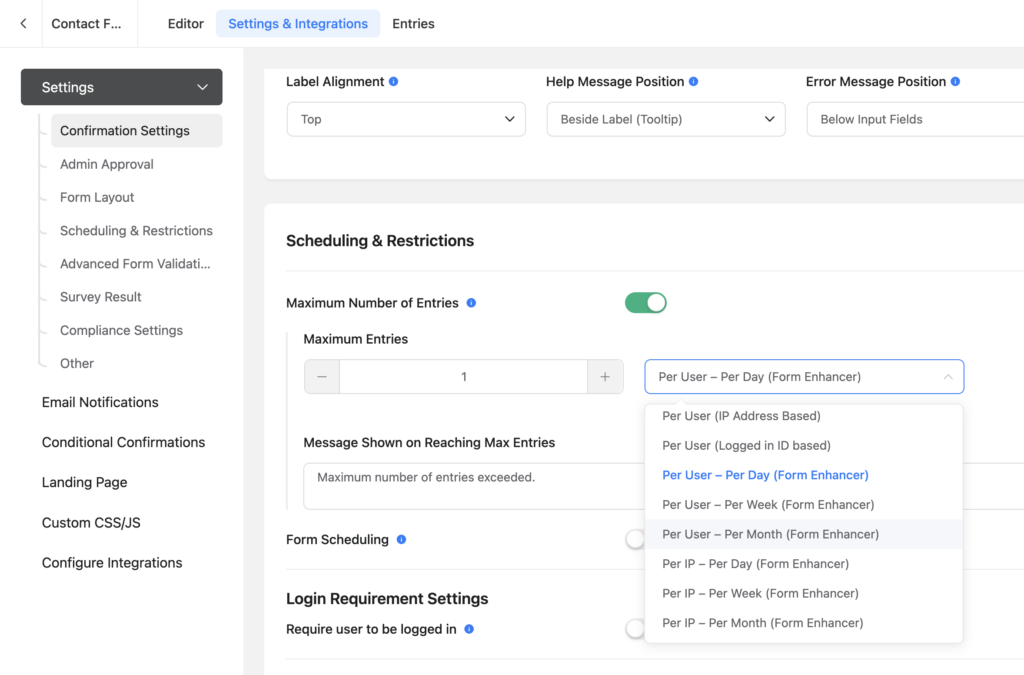
Fluent Forms’ built-in “Maximum Number of Entries” restriction makes you choose: either a time-based period (Per Day, Per Week, …) that counts all users combined, or a per-user limit (IP or logged-in ID) that counts all time — never both at once. Form Enhancer adds the missing combinations as new options in the same dropdown, so rules like “one submission per user per day” become a two-click setup.
Use Cases
- Request & suggestion forms – Let members of your community submit one request per day (e.g. song or video requests, support questions), so a few eager users can’t flood the queue.
- Contests & giveaways – One entry per user per week or per month, enforced server-side.
- Quota-based services – Cap how many tickets, bookings, or vouchers each account can claim per month.
- Public forms without login – Use the Per IP variants to throttle anonymous forms (e.g. one feedback submission per IP per day).
How to Use
- Enable Per-User Entry Limits under Settings → Form Enhancer → Fluent Forms → Features (PRO)
- Open your form’s Settings & Integrations → Scheduling & Restrictions
- Turn on Maximum Number of Entries and set the maximum (e.g.
1) - In the period dropdown, pick one of the new options, e.g. Per User – Per Day (Form Enhancer)
- Optionally customize the Message Shown on Reaching Max Entries and save
Available combinations: Per User (logged-in ID) or Per IP, each per Day / Week / Month / Year. The limit is enforced both when the form renders and when it is submitted, using the message you configured.
Key Features
Calendar Periods in Your Site’s Timezone
Periods reset at natural boundaries in the site timezone: midnight (Per Day), Monday 00:00 (Per Week), the 1st of the month, and January 1st — the same way Fluent Forms’ own periods are meant to work, but computed against your WordPress timezone setting.
Guests & Require Login
Per User periods apply to logged-in users only — visitors who aren’t logged in are not limited, exactly like Fluent Forms’ native “Per User (Logged in ID based)” option. Combine the limit with the native “Require user to be logged in” restriction (on the same settings page) to keep guests out entirely, or use a Per IP period for forms open to everyone.
Rides the Native Restriction
There is no separate settings screen: the new periods live in Fluent Forms’ own “Maximum Number of Entries” restriction and reuse its maximum-entries field and its limit-reached message. Trashed entries don’t count toward the limit, and the form editor’s preview stays visible to admins even when the limit is reached.
Notes
PRO feature — requires a Form Enhancer PRO license. Works with both the free and Pro versions of Fluent Forms (entry restrictions are a free Fluent Forms feature).
Per IP limits need IP logging: if IP logging is disabled in Fluent Forms’ global settings, submissions carry no IP address and Per IP periods cannot match them.
Shared networks: several people behind the same public IP address (offices, schools, mobile carriers) share a Per IP limit — prefer Per User periods where visitors can log in.
This field is part of the PRO version, which is not as expensive as you might think—it’s meant to support maintenance.
Table of Contents